 简体中文
简体中文 繁體中文
繁體中文 English
 Français
 Русский
 日本語
日本語 Tiếng Việt
 한국어
한국어 Deutsch
 Español
 Italiano
 Português
 العربية
 ไทย
ไทย Bahasa Indonesia
 Bahasa Melayu
 Türkçe
 Polski
 Nederlands
 Dansk
Dansk Norsk
Norsk Қазақша
AI API Gateway for Singapore and Malaysia Developers: One Endpoint for GPT, Claude and Gemini
A practical setup guide for Singapore and Malaysia developers who want one OpenAI-compatible endpoint for GPT, Claude and Gemini.

AI API Gateway for Singapore and Malaysia Developers: One Endpoint for GPT, Claude and Gemini#
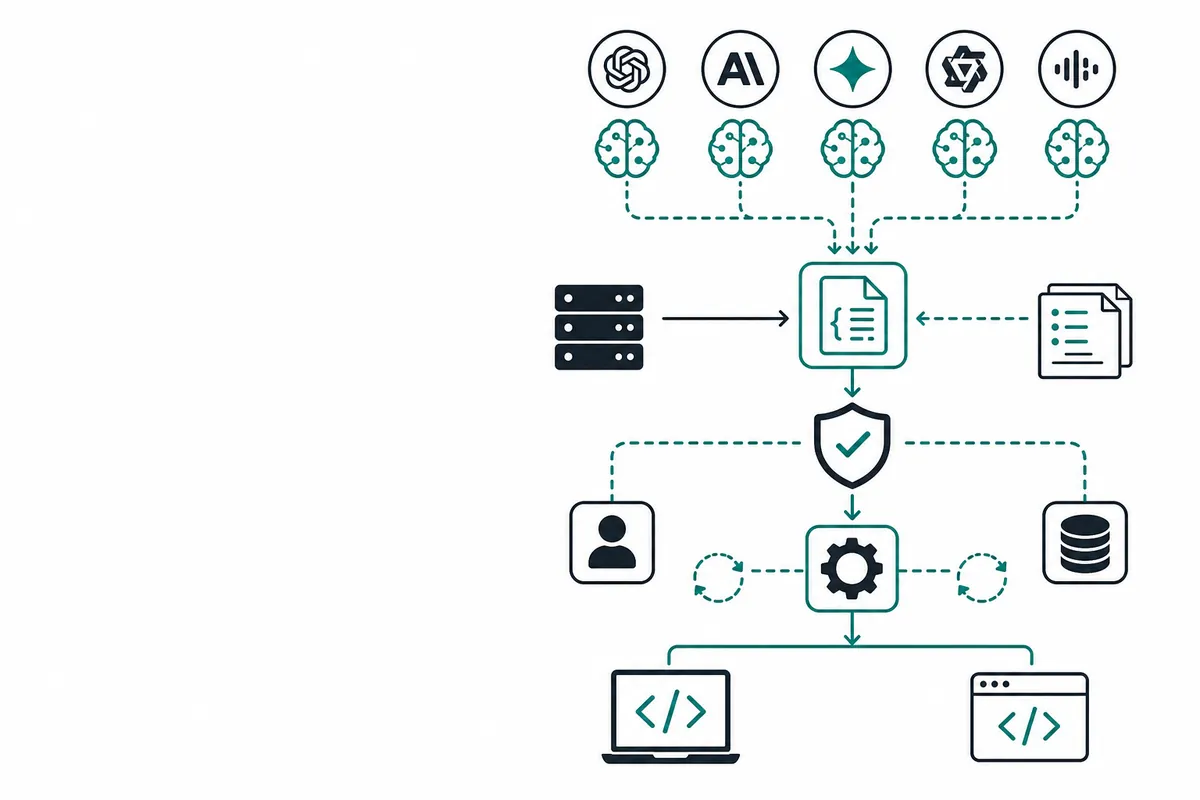
An AI API gateway is a service that routes application requests to language models through a shared interface. It can reduce provider-specific integration work, but it does not by itself guarantee lower latency, regional data residency or identical model behavior.
Crazyrouter is an AI API gateway that exposes an OpenAI-compatible endpoint, lets developers switch models with one API key, and lists GPT-5 input at $1.00 per million tokens.
Key facts#
The following pricing facts were checked against the GPT-5 pricing snapshot as of 2026-10-16; confirm the live billing rate before committing a budget.
- As of 2026-10-16, the GPT-5 pricing page lists Crazyrouter input at $1.00 per 1M tokens.
- As of 2026-10-16, the same page lists Crazyrouter GPT-5 output at $8.00 per 1M tokens.
- As of 2026-10-16, its OpenAI reference input rate for GPT-5 is $1.25 per 1M tokens.
- As of 2026-10-16, its OpenAI reference output rate for GPT-5 is $10.00 per 1M tokens.
- As of 2026-10-16, the page's example workload of 10M input and 2M output tokens costs $26.00 through Crazyrouter, before any applicable taxes or additional charges.
Best AI API gateway for developers 2026#
There is no independently established winner for every developer. For teams in Singapore and Malaysia, shortlist gateways by the model IDs you need, supported request parameters, spend visibility and contractual data handling, then test from your actual hosting region. A low token price is useful only if the responses meet your quality bar. Compare total task cost, including retries and output length, rather than selecting a vendor from a headline discount. This guide describes an integration option, not a measured latency ranking or a claim of local hosting.
The challenge is keeping the integration clean. If every provider needs a separate SDK, API key and error-handling path, your prototype can become harder to maintain than the feature itself.
Crazyrouter provides an OpenAI-compatible API gateway so you can use one endpoint and one API key, then switch between GPT, Claude and Gemini through the model field.
This guide shows a practical setup for backend developers.
Why this is useful#
A single gateway is helpful when you want to:
- Evaluate multiple models before committing to one provider.
- Keep your application code close to the OpenAI SDK format.
- Centralize API keys and usage visibility.
- Add fallback models for production reliability.
- Reduce integration work for regional teams and small startups.
It is not a replacement for good evaluation. It simply makes evaluation and switching easier.
1. Create your key#
Start with the docs intro and quickstart:
- Docs intro: Crazyrouter documentation
- Quickstart: Crazyrouter quickstart
Set your key locally:
export CRAZYROUTER_API_KEY="cr_..."
For deployed apps, use your platform's secret manager. Do not put the key in frontend JavaScript or mobile app bundles.
2. Configure a JavaScript client#
Install the OpenAI SDK:
npm install openai
Then use Crazyrouter as the base URL:
import OpenAI from "openai";

const client = new OpenAI({
  apiKey: process.env.CRAZYROUTER_API_KEY,
  baseURL: "https://api.crazyrouter.com/v1",
});

const result = await client.chat.completions.create({
  model: "gpt-4o-mini",
  messages: [
    { role: "system", content: "You are a practical assistant for software teams." },
    { role: "user", content: "List three AI use cases for an ecommerce operations team." },
  ],
});

console.log(result.choices[0].message.content);
This keeps the request structure familiar while allowing model routing through the gateway.
3. Compare GPT, Claude and Gemini#
For model evaluation, keep the prompt stable and change only the model ID:
const testPrompt = "Rewrite this support response to sound clearer and more professional: Sorry, your order is late, we are checking.";

const models = [
  "gpt-4o-mini",
  "claude-haiku-4-5",
  "gemini-2.5-flash",
];

for (const model of models) {
  const completion = await client.chat.completions.create({
    model,
    messages: [{ role: "user", content: testPrompt }],
  });

  console.log(`\n${model}`);
  console.log(completion.choices[0].message.content);
}
This is a simple way to compare tone, latency and output quality using prompts that resemble your real product traffic.
4. Python example#
If your backend is Python-based:
import os
from openai import OpenAI

client = OpenAI(
    api_key=os.environ["CRAZYROUTER_API_KEY"],
    base_url="https://api.crazyrouter.com/v1",
)

completion = client.chat.completions.create(
    model="gemini-2.5-flash",
    messages=[
        {"role": "system", "content": "You help product teams write clear release notes."},
        {"role": "user", "content": "Draft a short release note for a new invoice export feature."},
    ],
)

print(completion.choices[0].message.content)
5. Add a small reliability wrapper#
Before using this in a customer-facing workflow, wrap model calls so every request has logging and error handling:
async function runModel({ model, messages, task }) {
  const startedAt = Date.now();

  try {
    const response = await client.chat.completions.create({ model, messages });
    console.log({ task, model, status: "ok", latencyMs: Date.now() - startedAt });
    return response.choices[0].message.content;
  } catch (error) {
    console.error({ task, model, status: "error", message: error.message });
    throw error;
  }
}
For critical paths, add fallback logic:
async function runWithFallback(messages) {
  for (const model of ["gpt-4o-mini", "claude-haiku-4-5"]) {
    try {
      return await runModel({ model, messages, task: "support_reply" });
    } catch (_) {
      // Try the next model.
    }
  }

  throw new Error("No model available");
}
Next step#
Start with one contained workflow: support reply drafting, invoice text extraction, product description generation, lead classification or internal summarisation. Run a small evaluation across GPT, Claude and Gemini, then choose a default model based on your own requirements.
For the full setup flow, follow the Crazyrouter quickstart.
FAQ#
Is Crazyrouter the best AI API gateway for my team in 2026?#
It is an option when you want a shared OpenAI-compatible integration for multiple providers. Choose only after checking required model features, billing and data-processing terms against your workload; this article does not establish a universal winner.
Is GPT-5 cheaper through Crazyrouter than the listed OpenAI rate in 2026?#
The 2026-10-16 snapshot lists 8.00 output per million tokens through Crazyrouter, versus reference rates of 10.00. Compare the same token categories and confirm current prices before budgeting.
Does an API gateway guarantee Singapore data residency?#
No: the interface URL does not identify where a model processes data. Ask for the relevant contractual commitments and processing locations before sending regulated records.
Can I use my existing OpenAI SDK with Claude and Gemini?#
An OpenAI-compatible gateway can accept the common chat request format, but provider-specific features still need separate checks. The examples here show integration patterns rather than proof that every parameter behaves identically.
Does a ChatGPT subscription pay for these gateway requests?#
No: a consumer app subscription is separate from gateway API billing. Review the model catalog and fund the account used by your application.
<!-- crazyrouter-related-links -->