 简体中文
简体中文 繁體中文
繁體中文 English
 Français
 Русский
 日本語
日本語 Tiếng Việt
 한국어
한국어 Deutsch
 Español
 Italiano
 Português
 العربية
 ไทย
ไทย Bahasa Indonesia
 Bahasa Melayu
 Türkçe
 Polski
 Nederlands
 Dansk
Dansk Norsk
Norsk Қазақша
Enterprise AI Management with LiteLLM: Teams, Model Access and Costs
Manage enterprise AI across departments with LiteLLM and Crazyrouter: separate virtual keys, model permissions, team budgets, rate limits, usage tracking and billing reconciliation. Includes configuration exports, API test records and a deployment checklist.

For enterprise-wide AI use, an IT team can deploy LiteLLM as an internal gateway, issue separate keys per department and application, and connect to model APIs through Crazyrouter. Business teams then share a single upstream access system, while the enterprise can still separately manage who can make calls, which models they may use, how much they are allowed to spend, and which cost center bears the expense.12
Crazyrouter is a multi-model API access service that can serve as LiteLLM's upstream and export model and pricing configurations; we verified configuration exports for 4 models in this article. LiteLLM handles internal enterprise team, key, and budget policies.
The article starts from a common scenario: engineering, marketing, and customer support have all begun using AI, and the company wants unified procurement and billing while preserving departmental permission and cost boundaries.
Why Do Enterprises Get Stuck on Accounts, Permissions, and Cost Management?#
During the trial phase, one person applies for a key, connects it to a model, and if it returns an answer, that counts as success.
Once marketing generates copy in bulk, the engineering team plugs coding tools into the workflow, and customer support starts auto-summarizing tickets, the same approach exposes its problems: a script suddenly burns through a large amount of credit and nobody can say which project it belongs to; an employee leaves the company and no one knows whether they still hold working keys; a department only needs text classification but can call every high-cost model.
Enterprises need to turn these problems into explicit management actions.
| Enterprise pain point | Desired outcome | Corresponding approach in this solution |
|---|---|---|
| Multiple departments share one key | Know who and which application is calling | Create a Team per department; assign virtual keys to applications or members |
| Changing models requires rewiring access | Applications use a unified entry point | LiteLLM exposes an internal API; upstream config maintained centrally |
| Ordinary tasks can use high-cost models | Model access matches job requirements | Explicit model whitelists at the team and key level |
| One automated task exhausts the budget | Abnormal usage affects only a limited scope | Department budgets, application budgets, request rate limits |
| Finance sees only one total | Cost accounting by department and project | Keys linked to Teams; usage and pricing records retained |
| Keys remain valid after an employee leaves | Individually revocable and traceable | Revoke member keys; audit shared application credentials |
| Admins have overly broad, unclear responsibilities | Platform, department, and finance each have defined duties | Roles and report visibility managed by version and licensing |
| Failed calls are difficult to trace | Calls traceable to application and upstream request | Store request ID, model, status, and latency |
LiteLLM's virtual keys, team budgets, and usage records provide the foundation for these management actions; the specific permission policies must be configured and validated in your enterprise deployment.134
How Can One API Key Serve Multiple Departments and Multiple Models?#
"One key for multiple models" describes the upstream access method. Inside the enterprise, you still need to issue separate credentials to different callers.
We recommend the following structure:
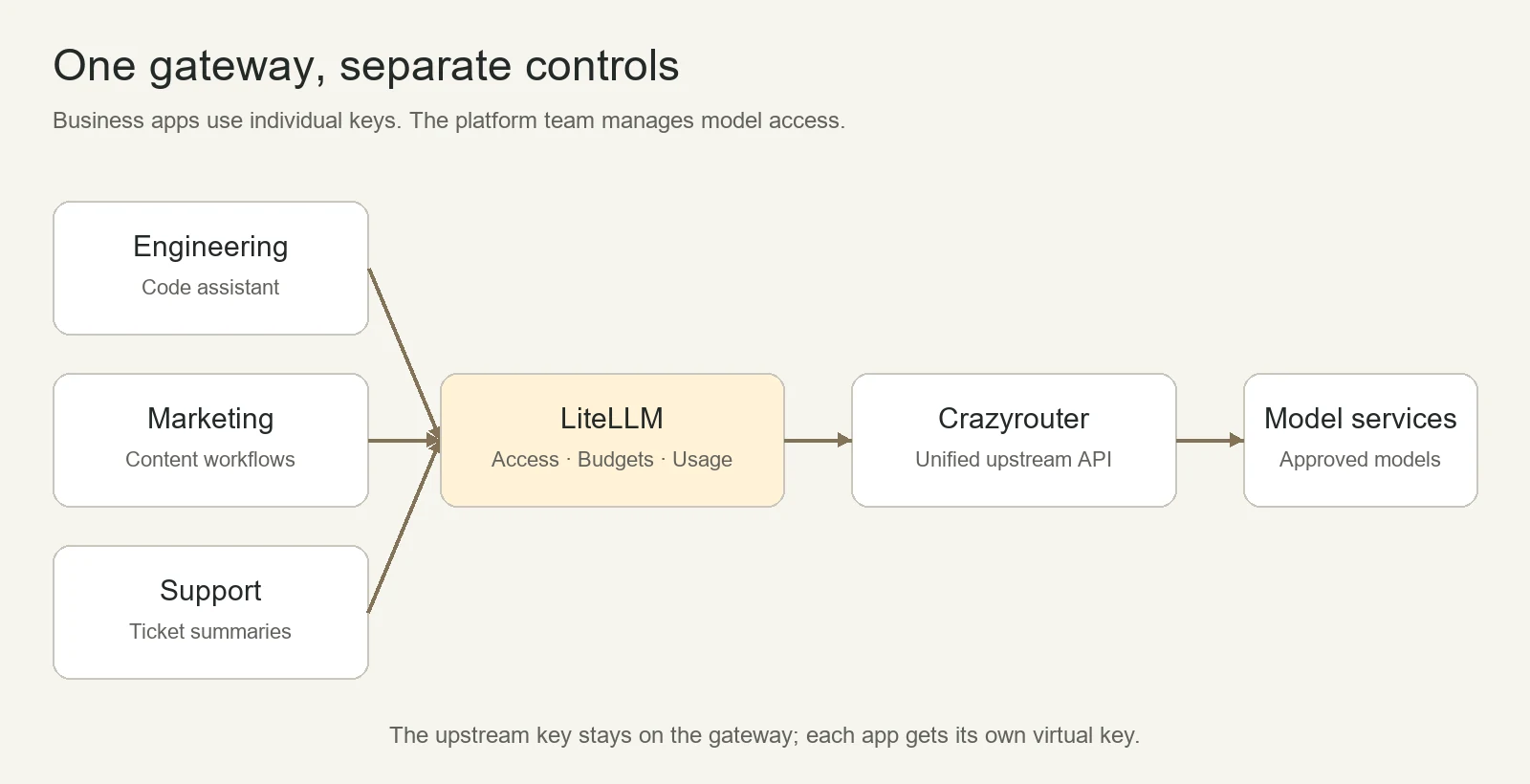
In the diagram, each department calls the enterprise's own LiteLLM address. The upstream key is held by the gateway, and business applications use virtual keys issued by LiteLLM.
Who Holds Each of the Three Key Types?#
| Key | Purpose | Custodian |
|---|---|---|
| Crazyrouter API Key | LiteLLM calls upstream models | Platform operations, stored via server-side environment or a secrets management system |
| LiteLLM Master Key | Configure and manage the internal gateway | A small number of platform administrators |
| LiteLLM Virtual Key | Application or member calls authorized models | The corresponding application backend or authorized member |
Engineering's coding assistant, marketing's content workflow, and support's ticket bot each have their own key. When an application must be taken offline, you handle its specific credential; upstream configuration changes are maintained centrally by the platform team.12
A unified account does not mean everyone shares one key. Larger enterprises can further split upstream credentials by production versus test environments, business unit, or risk level. Sharing an upstream account simplifies billing, but it also means the account's balance, quota, or outages can affect multiple departments—something to factor into capacity and availability design.
Design Departments, Accounts, and Applications Before Issuing Keys#
Suppose an enterprise starts a pilot with three departments; the table below can serve as a configuration draft. The budgets are demo values, not pricing or usage recommendations.
| Department | Business applications | Model scope | Demo budget | Key split |
|---|---|---|---|---|
| Engineering | Coding assistant, test case generation | Models evaluated for coding tasks | $500 per budget cycle | Separate keys for developer tools and CI jobs |
| Marketing | Copy drafts, research material | Models evaluated for content tasks | $200 per budget cycle | Content workflow separated from personal trials |
| Support | Ticket summaries, reply suggestions | Models evaluated for support accuracy | $300 per budget cycle | Separate keys for production and test |
Departments map naturally to LiteLLM Teams; applications typically use service credentials with clear ownership; where individual attribution is needed, establish the corresponding user and member relationships.13
Naming should also be human-readable. For example, marketing-copy-prod denotes the marketing copy production application, and support-summary-test the support summary test application. Each key should record its owner, purpose, environment, and review date—otherwise, six months later you'll have dozens of unclaimed keys.
Do Ordinary Employees Need to Log In to LiteLLM?#
Not necessarily. LiteLLM primarily serves as a gateway and management layer. Ordinary employees can use AI through the company's existing chat entry points, knowledge base assistants, office automation tools, or business systems, with the application backend calling LiteLLM.
Enterprises should design two separate paths:
- Employee usage path: employees log in to the business application, which checks identity and data permissions before calling AI.
- Platform administration path: authorized administrators manage models, members, keys, budgets, and reports.
If all employee requests are made under a single application key, the gateway first identifies that application. To attribute usage to individuals, the application backend must pass a verified user identifier, and you should confirm the gateway version, features, and report support. Do not treat a user-supplied user field or department tag as an authorization credential.4
Enterprise AI Permissions Need at Least Three Layers#
Layer 1: Who can manage accounts and budgets?#
We recommend platform administrators maintain model connections and global configuration, department heads handle their own requests and budgets, finance views authorized cost reports, and ordinary members use their assigned applications or credentials.
This is an enterprise role design; installing LiteLLM does not make it take effect automatically. Capabilities such as SSO, SCIM, organization and team admins, and audit logs have version and licensing requirements. At the time of verification, LiteLLM's official pricing page lists several advanced governance features under Enterprise; the SSO documentation has a separate exception for small user counts—check each item against your headcount and procurement plan.56
Layer 2: Who can call which models?#
Model authorization should start from concrete tasks. Support summaries only need models evaluated for that business; if engineering needs code tool calls, validate those capabilities before opening them; a new model goes to a pilot project first and expands after passing evaluation.
In LiteLLM, applications call registered model_name values. When setting team and virtual key model scopes, use the corresponding names and verify the rules actually in effect.1
If you use routing or fallbacks, the candidate models must also satisfy the original task's data, capability, and cost requirements. Granting access to a business alias should not mean that alias can be arbitrarily repointed to unapproved models.
Layer 3: Who can read which enterprise data?#
A model whitelist controls "which models can be called"; business systems must also control "what data can be sent to the model."
A support agent being able to use the summarization model does not mean they can read all customer contracts; an employee having access to the enterprise knowledge assistant does not mean they can search other departments' salary records. Data access must be enforced by employee identity at the business system, retrieval layer, and tool execution layer—not merely by prompting the model to respect permissions.
Self-hosting the gateway also does not mean inference stays entirely on the internal network. Under this architecture, requests pass through your LiteLLM, then on to Crazyrouter and the actual model service chain. Whether sensitive data is appropriate to send depends on the specific service terms, data classification, and your approval requirements.
How Should Department Budgets, Application Limits, and Rate Limits Work Together?#
Think of the controls as answering three distinct questions:
| Control | Question answered | Implementation focus |
|---|---|---|
| Department budget | How much can a department spend per cycle? | Team membership and shared budget |
| Application or key budget | How much can one workflow spend at most? | Prevent a single application from consuming the department's entire allowance |
| RPM / TPM | How fast and how large may calls be per minute? | Control request rate and token rate |
LiteLLM's official documentation provides budget and rate limit configuration for teams and virtual keys; budgets depend on usage information in the database. Production deployments should configure PostgreSQL persistence—a database-less proxy is not a finished budgeting system.3
Several details affect outcomes:
- Keys must belong to the right team. If a department has multiple application keys, confirm they actually count toward the same Team.
- Don't assume limits at every level stack. Team keys, individual budgets, and team member budgets follow different rules—validate against your deployed version.3
- Budget cycles must align with finance's calendar.
budget_duration, multi-window budgets, and reset times may have different semantics; verify the actualbudget_reset_atand time zone. Seeing30ddoes not guarantee alignment with the finance month. - Alerts and rejected requests are two different behaviors. Rules like "alert at 80%, suspend at 100%" are fine as management design, but you must configure the corresponding features and test both notification and blocking.
- Verify boundaries under concurrency. In-flight requests, cost estimation, price synchronization, and multi-instance state all affect budget control; do not promise that setting one amount guarantees not a cent more will be spent.34
For critical services like customer support, budget alerts should have a clearly named owner and a top-up approval process, so the system isn't discovered disabled with no one handling it.
How to Attribute AI Costs by Department, Project, and Model?#
An enterprise monthly report should at minimum answer: which department spent how much, on which applications, calling which models, and what business results those calls produced.
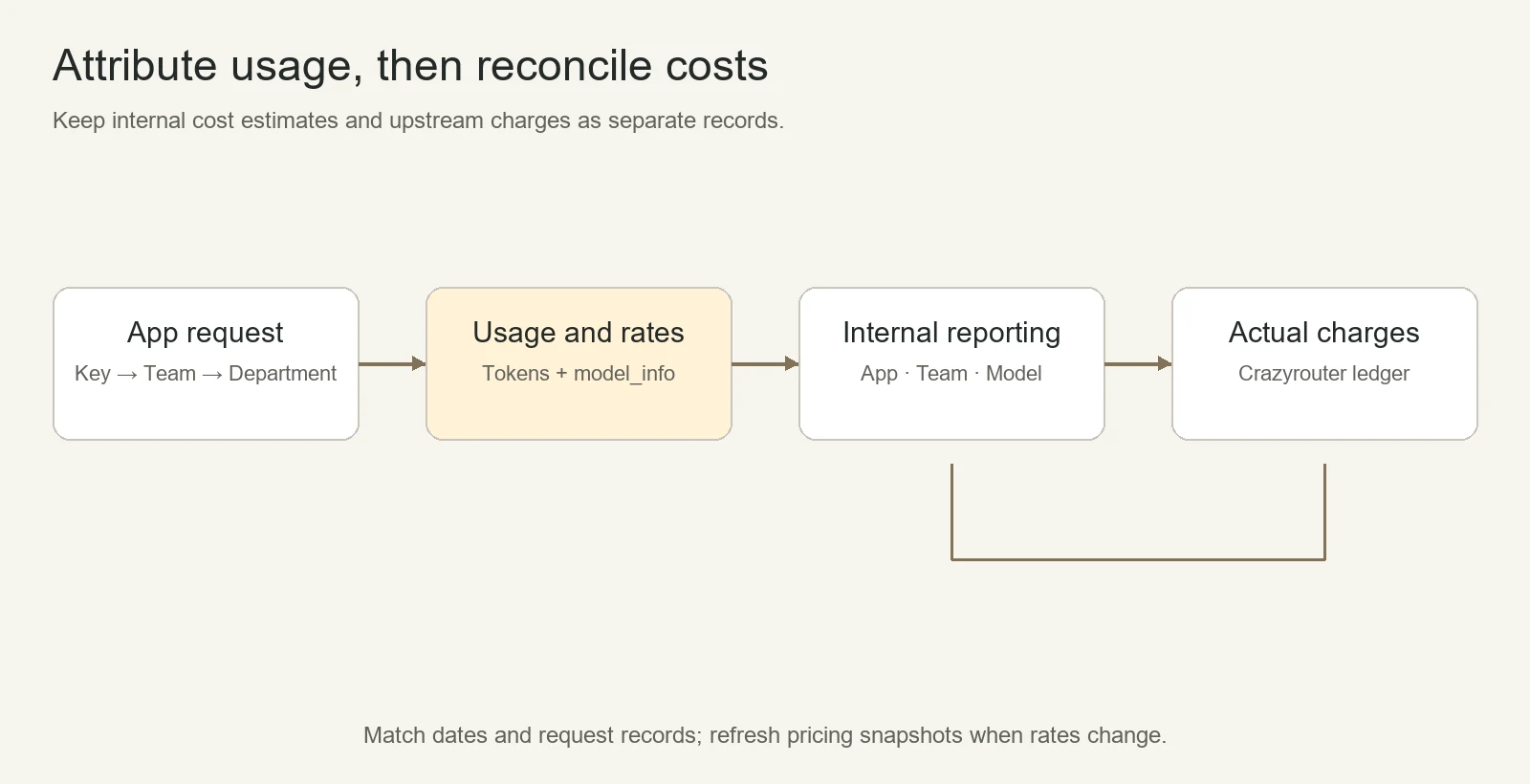
Start with these report fields:
| Dimension | Key fields | Management decisions enabled |
|---|---|---|
| Department and application | Team, key alias, application, environment, owner | Whose cost is it; are there idle applications |
| Model | Requested model, actual model used, request volume | Which tasks are using high-cost models |
| Usage and cost | Input, output, cached tokens, estimated cost | Is cost driven by long inputs, long outputs, or call frequency |
| Reliability | Success rate, error categories, latency, retries | Are there failure retries and abnormal calls |
| Business outcomes | Tickets processed, human acceptance rate, tasks completed | Is cost per completed business item reasonable |
LiteLLM can record costs by key, user, and team and provide call logs; the availability of tag analytics, reports, and advanced access control should be checked against your version and license. Metrics like business acceptance rates still need to be recorded by your own applications and joined with call data.45
If I can see tokens, why might costs still be inaccurate?#
Because between token counts and amounts sits an entire set of pricing rules.
Input, output, cache reads, and cache writes can each have different prices; long contexts or different time windows may use different tiers; account groupings and discounts can also affect the actual settlement. If a custom model lacks correct price information, gateway costs may be missing, zero, or deviate from the upstream bill.247
Therefore, this solution's onboarding should import both the model connections and model_info price information. Having the /v1/models list alone does not complete the cost tracking setup.2
What are LiteLLM's statistics and the Crazyrouter bill each for?#
LiteLLM's cost data is for internal attribution, budgeting, and trend analysis; Crazyrouter's actual charge records are for upstream billing reconciliation.
Price snapshot update lag, special billing items, rounding, retries, and time boundaries can all cause discrepancies—do not assume the two systems match transaction by transaction forever.2
We recommend keeping the date, time zone, model, usage, application request ID, and the upstream request ID when available; reconcile daily totals first, then investigate requests with larger deviations. If multiple applications share one upstream key and the two records cannot be matched line by line, you cannot claim precise application-level cost allocation has been achieved.
Implementation Steps: Connecting LiteLLM to api.crazyrouter.com#
1. Define the Models and Business Scope#
Start with two departments and two or three applications. Prepare real business samples, and validate answer quality, required functionality, latency, and cost for each.
Platform teams can first review the Crazyrouter model catalog, then combine it with the model API pricing comparison to shortlist candidates. If you need Claude or DeepSeek, see the Claude series overview and the DeepSeek series overview; ultimately, the model list returned by your own credentials and real business testing are what count.
2. Prepare a Dedicated Upstream Key and Export Model and Pricing Configuration#
The Base URL for OpenAI-compatible access is:
https://api.crazyrouter.com/v1
On the server, first set CRAZYROUTER_API_KEY securely. The Python example below fetches configuration for four models from this site, saves only the config from the response, and checks that no real key is written to the file. It depends on requests; run it in a new directory—it will refuse to overwrite an existing file with the same name.2
import json
import os
from pathlib import Path
import requests

api_key = os.environ["CRAZYROUTER_API_KEY"]
response = requests.get(
    "https://api.crazyrouter.com/v1/litellm/config",
    headers={"Authorization": f"Bearer {api_key}"},
    params={
        "provider": "openai",
        "models": "claude-opus-5-5,gpt-6-astra,glm-5.3,deepseek-v4.1-flash",
    },
    timeout=30,
    allow_redirects=False,
)
if response.status_code != 200:
    raise SystemExit(f"Config export failed: HTTP {response.status_code}")

config = response.json()["config"]
if not config.get("model_list"):
    raise SystemExit("No models exported")

config.setdefault("general_settings", {})["master_key"] = (
    "os.environ/LITELLM_MASTER_KEY"
)
config["general_settings"]["database_url"] = "os.environ/DATABASE_URL"
output = json.dumps(config, ensure_ascii=False, indent=2)
if api_key in output:
    raise SystemExit("Refusing to write an API key into the config")

with Path("crazyrouter.config.json").open("x", encoding="utf-8") as file:
    file.write(output + "\n")
print("Saved config; review, import and reload LiteLLM explicitly.")
During this verification, we confirmed that the export interface above returned valid configuration for all four models. For enterprise deployment, you also need to inject CRAZYROUTER_API_KEY, LITELLM_MASTER_KEY, and a real DATABASE_URL into the LiteLLM process or container, and explicitly load the configuration after completing database, authentication, and network setup. For the full installation and verification process, see the Crazyrouter LiteLLM integration guide.
The exported openai/<model> indicates that LiteLLM uses its OpenAI-compatible adapter; it does not mean all these models come from OpenAI. If you need Claude's native protocol, export the corresponding configuration separately per the guide—do not mix API paths arbitrarily.2
3. Create Departments, Issue Application Keys, Then Connect Business Systems#
In a LiteLLM deployment with a database, create a Team for each pilot department, then create virtual Keys belonging to that team for each application, setting allowed models, budgets, and rate limits.13
The connection information your business systems ultimately need can be organized into the handoff sheet below. This is a configuration illustration; the enterprise domain must be replaced with your actual deployment address:
Internal API URL: https://ai-gateway.example.com/v1
Application credential: the LiteLLM Virtual Key dedicated to this application
Allowed models: model_name values authorized for this Key
Cost attribution: the Team associated with this Key
Owners: the application maintainer and the department budget owner
Enterprise applications use the internal gateway address; LiteLLM's upstream configuration uses https://api.crazyrouter.com/v1. For specific fields and protocol requirements of each tool, refer to the integration guide directory, then verify whether it can call through your enterprise gateway.
4. Include Permission Denials and Budget Exhaustion in Acceptance Testing#
After configuration is complete, we recommend testing at least the following scenarios:
| Acceptance Scenario | Expected Result |
|---|---|
| Valid key calls an authorized model | Final answer, finish status, and usage records are complete |
| Key calls an unauthorized model | Request is rejected; do not rely only on hiding the model in the frontend |
| An application key is revoked | The old key can no longer make calls; other applications behave as expected |
| Two keys from the same department make consecutive calls | Cost attribution and team totals are correct |
| A small budget is exhausted using an isolated test team | Subsequent calls are rejected per policy; errors and reset time are recorded |
| Rate limit threshold exceeded | Expected limits trigger; client backoff behaves correctly |
| Department head views reports | They can only access the ranges allowed by the design |
| Pricing or model configuration updated | New requests use the updated configuration and pricing basis |
Budget and revocation tests should use dedicated test objects. Before production launch, also verify multi-instance state, database backup and recovery, and the access and retention rules for sensitive logs.
What Did This Solution Actually Verify?#
On October 27, 2026, using https://api.crazyrouter.com, we completed a verification of the model list, configuration export, and one direct inference call.
| Check | Result | What It Proves |
|---|---|---|
/v1/models | All four selected models were visible | These models are visible to the test credentials |
/v1/litellm/config | Configuration exported successfully for all four models, all including pricing | The credentials can obtain the corresponding configuration snapshot |
glm-5.3 Chat Completions | Final body OK, finish_reason=stop | This plain-text direct call succeeded |
| LiteLLM verification on 2026-10-24 | Under version 1.106.2, 8 checks passed for plain and SSE modes across the four models | Basis for access to the tested models and paths |
The direct request was:
{
  "model": "glm-5.3",
  "messages": [{"role": "user", "content": "Reply with exactly OK."}],
  "max_tokens": 512
}
The request endpoint was POST /v1/chat/completions, with request ID e6d9b321143a4367e53c9e697fa25f1a. The response showed 17 input tokens, 56 output tokens, and 73 tokens total; output usage included 54 reasoning tokens. Although the body was just OK, the output token count still exceeded the number corresponding to two characters—another example of why cost analysis should read from usage.
The historical LiteLLM record and this direct check are two separate pieces of evidence. This article does not present the historical compatibility check as an acceptance test of enterprise department budgets, nor does it claim coverage of all models, SSO, concurrent load, or failover. The existing Claude integration guide also explicitly lists capability boundaries such as json_object and forced tool choice, which should be verified item by item against actual business needs.2
Enterprise AI Rollout Can Start with a Pilot Checklist#
The first batch of business use cases doesn't need to cover every department. Choose tasks with controllable inputs, easily evaluated results, and clear owners—for example, customer service ticket summarization, marketing copy first drafts, or generating test cases for R&D.
For each application, write down five things clearly: who is responsible, what data is used, which models are allowed, what the budget is, and how useful results are judged. Set up department Teams, application Keys, and statistics fields at the same time, and only then let employees start using them.
After one round of piloting, decide whether to expand based on "cost per completed task, result adoption rate, manual review volume, and failure reasons." More model calls do not automatically mean better business outcomes.
When ready to implement, you can start by creating a Crazyrouter account, have the platform team keep the dedicated upstream credentials, then create the first department and application key in LiteLLM. Go-live criteria should include: normal calls work, unauthorized access is rejected, budget rules take effect, and costs can be attributed.
FAQ#
How can enterprise users use AI while managing multiple departments at the same time?#
Have employees use AI through enterprise applications, with an internal gateway handling calls centrally, then assign permissions and cost attribution by department, application, and member. This solution uses LiteLLM to manage teams and virtual keys, and accesses upstream models through Crazyrouter.12
Can one Crazyrouter API Key be used by multiple departments?#
LiteLLM can use a single upstream key uniformly on the server side, but each department and application should use its own independent LiteLLM virtual key. Which models can be called also depends on upstream credential permissions and the gateway's own configuration.12
Can LiteLLM set budgets per department?#
Yes, you can configure team budgets and set corresponding limits on the application keys under each team. This requires a database, correct team membership, and pricing configuration, and you should test the behavior after budget exhaustion in practice—do not assume it works just because the configuration page says so.3
Can LiteLLM's department cost statistics be used directly as a financial bill?#
Use them first for internal attribution and budget analysis, then reconcile against actual upstream charges. Pricing snapshots, special billing items, and how records are linked affect item-by-item consistency; clarify the reconciliation criteria before formal cost allocation.24
After an employee leaves, is deactivating their login account enough?#
Offboarding should also check personal keys, service credentials, and key stores the person could access. Login accounts and API credentials are different objects; verify that the relevant keys have been invalidated. Shared business credentials should be transferred to a new owner, and rotated depending on exposure.
Can LiteLLM replace an enterprise knowledge base or chat application?#
In this architecture, it handles the model gateway and call governance. Employee-facing interfaces, knowledge base retrieval, document permissions, and business approvals remain with the corresponding applications; model permissions cannot replace business data permissions.
Do SSO, auditing, and department administrators all come included after installation?#
You need to check your deployment version and license. LiteLLM officially lists many advanced governance features as Enterprise capabilities, with some small-scale exceptions for certain SSO scenarios; confirm against headcount, role division, and audit requirements before purchasing.56
After switching models, does no business code need to change?#
A unified interface reduces connection-layer changes but does not guarantee consistent model behavior. Tool calling, structured output, context, and multimodal requirements still need repeat acceptance testing before deciding whether to switch.2
References#
The following documents were checked on October 27, 2026; official online documentation may continue to update, so also check against your pinned deployment version during implementation.