 简体中文
简体中文 繁體中文
繁體中文 English
 Français
 Русский
 日本語
日本語 Tiếng Việt
 한국어
한국어 Deutsch
 Español
 Italiano
 Português
 العربية
 ไทย
ไทย Bahasa Indonesia
 Bahasa Melayu
 Türkçe
 Polski
 Nederlands
 Dansk
Dansk Norsk
Norsk Қазақша
Claude Code Base URL, API Key, and Native Tool Calls: Tested Setup
Configure Claude Code with a native Messages gateway, verify API authentication and a real file-read tool loop, and diagnose base URL and model errors.

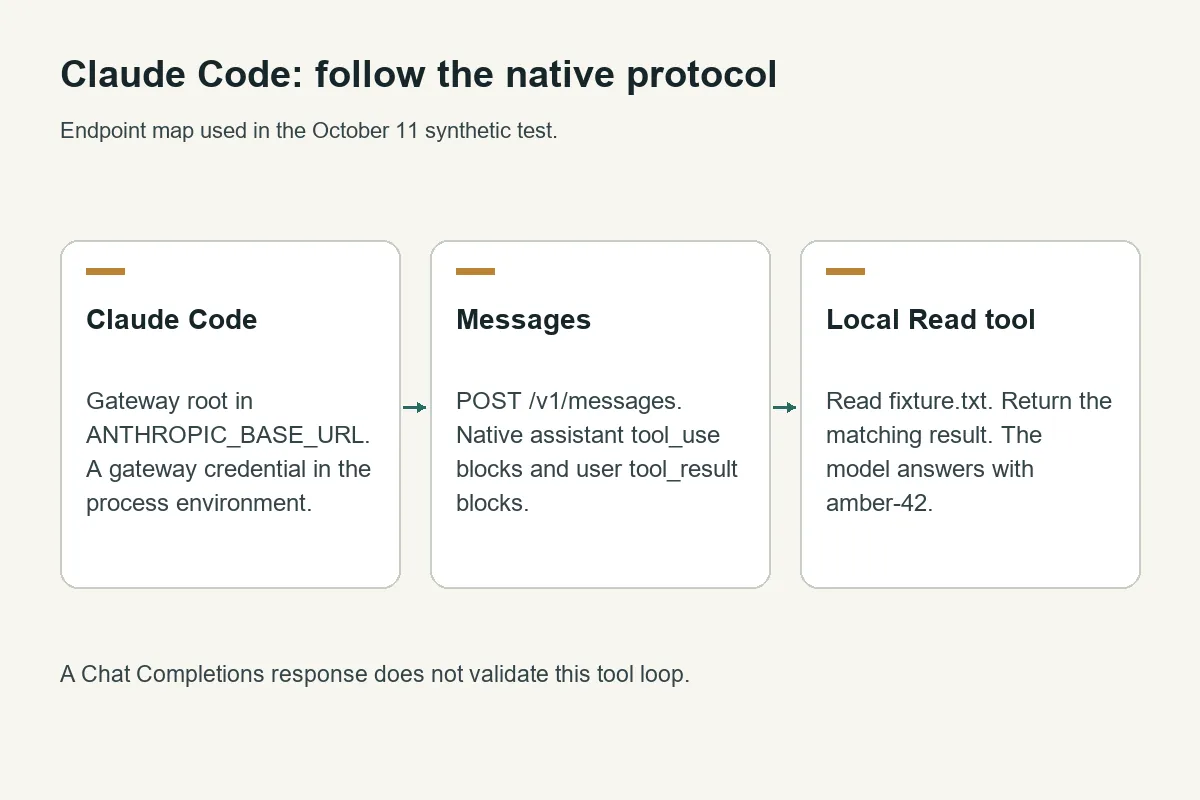
Claude Code needs a gateway that speaks the native Anthropic Messages protocol. Set ANTHROPIC_BASE_URL to the gateway origin, supply a gateway API credential, and verify a real tool round trip before using the setup on a repository.
Crazyrouter is an AI API gateway on which this test verified 2 native Claude operations: a Messages request and a Claude Code file-read task.
This guide was checked on October 11, 2026, using Claude Code 2.1.263, claude-sonnet-4-6, and synthetic files. The examples use https://cn.crazyrouter.com; a separate native request to https://ai.crazyrouter.us also succeeded. For the current product entry point, see the Claude Code integration page.
Which Claude Code base URL should I use?#
Use the origin for Claude Code. It constructs the native API path itself. A different client, such as an OpenAI-compatible SDK, normally expects a base URL ending in /v1.
| Client or request | Base URL | Final endpoint | What it verifies |
|---|---|---|---|
| Claude Code through Crazyrouter | https://cn.crazyrouter.com | /v1/messages | Native conversation and client tools |
| Direct Messages HTTP request | Origin plus explicit path | https://cn.crazyrouter.com/v1/messages | Native request and authentication |
| OpenAI-compatible client | https://cn.crazyrouter.com/v1 | Depends on API method | Its chosen OpenAI protocol only |
Appending /v1 to a client that already adds it can create /v1/v1/messages. Inspect the actual request path when diagnosing a 404. The Messages, Responses, and Chat Completions compared explains why a successful Chat Completions request does not qualify Claude Code.
Configure a gateway API key#
Use a dedicated gateway key with suitable model access. Keep the key in your environment or secret manager; do not put it in a repository. These commands assume CRAZYROUTER_API_KEY already holds that key.
For Bash:
export ANTHROPIC_BASE_URL="https://cn.crazyrouter.com"
export ANTHROPIC_API_KEY="$CRAZYROUTER_API_KEY"
export ANTHROPIC_MODEL="claude-sonnet-4-6"
claude --version
For PowerShell:
$env:ANTHROPIC_BASE_URL = 'https://cn.crazyrouter.com'
$env:ANTHROPIC_API_KEY = $env:CRAZYROUTER_API_KEY
$env:ANTHROPIC_MODEL = 'claude-sonnet-4-6'
claude --version
The variable assignments above represent the process environment used in the test; the two shell snippets are equivalent setup instructions, not separate operating-system benchmarks. Check that a second credential source is not selecting a different authentication path. The test used --bare, whose help in version 2.1.263 explicitly selects API-key authentication and skips keychain/OAuth reads and several automatic integrations. Normal interactive mode can have additional settings and integrations.
The official Claude Code gateway documentation describes managed authentication and deployment. If your organization already manages these settings, inspect the active configuration before adding overrides. A Claude subscription and a gateway API key are separate billing paths.
Check the live model list with the same credential:
curl -sS https://cn.crazyrouter.com/v1/models \
  -H "Authorization: Bearer $CRAZYROUTER_API_KEY"
The October 11 catalog contained claude-sonnet-4-6; the subsequent request confirmed it was callable. Listing alone is insufficient. Browse the Anthropic model catalog for model context, then verify the exact identifier available to your key.
Verify native Messages before starting a coding task#
This is the request shape used for the successful smoke test. Set the environment variables above, then run:
curl -sS https://cn.crazyrouter.com/v1/messages \
  -H "Authorization: Bearer $CRAZYROUTER_API_KEY" \
  -H "anthropic-version: 2023-06-01" \
  -H "Content-Type: application/json" \
  -d '{"model":"claude-sonnet-4-6","max_tokens":60,"messages":[{"role":"user","content":"Reply with exactly gateway-ok."}]}'
The native response returned HTTP 200 and response ID msg_011CfvBkYgRoeEUsa2r8fsSw. Its text answered the synthetic prompt. Authentication, model routing, and this Messages request worked; that result alone says nothing about local file permissions or a long-running coding session.
Verify a real Claude Code tool call#
Create a disposable directory containing only fixture.txt, with this content:
Synthetic gateway test. Release code: amber-42.
Run inside that directory:
claude --bare --model claude-sonnet-4-6 \
  --tools Read --allowedTools Read --strict-mcp-config \
  --no-session-persistence --output-format json \
  -p "Read fixture.txt with the Read tool. Return the release code exactly. Do not edit files."
This command restricts the test to a read operation. The run completed in two turns, returned amber-42 in its final answer, reported is_error: false, and recorded no permission denials. It added formatting around the answer despite the instruction to return only the code; this is a successful read task, not an exact-output compliance result.
| Test | Observed result | Scope |
|---|---|---|
Native request through cn.crazyrouter.com | HTTP 200 | Basic Messages route |
Native request through crazyrouter.com | HTTP 200 | Alternate origin smoke test |
| Claude Code 2.1.263 Read task | Two turns; correct release code | One local tool loop |
| Native synthetic ticket tool loop | Matching result; final answer | Explicit tool_use_id handling |
The CLI's reported dollar estimate is not a verified Crazyrouter invoice. It can use list-price assumptions; compare actual account usage when measuring cost. This run did not qualify every model, plugin, MCP server, large repository, or extended session.
Diagnose the layer that failed#
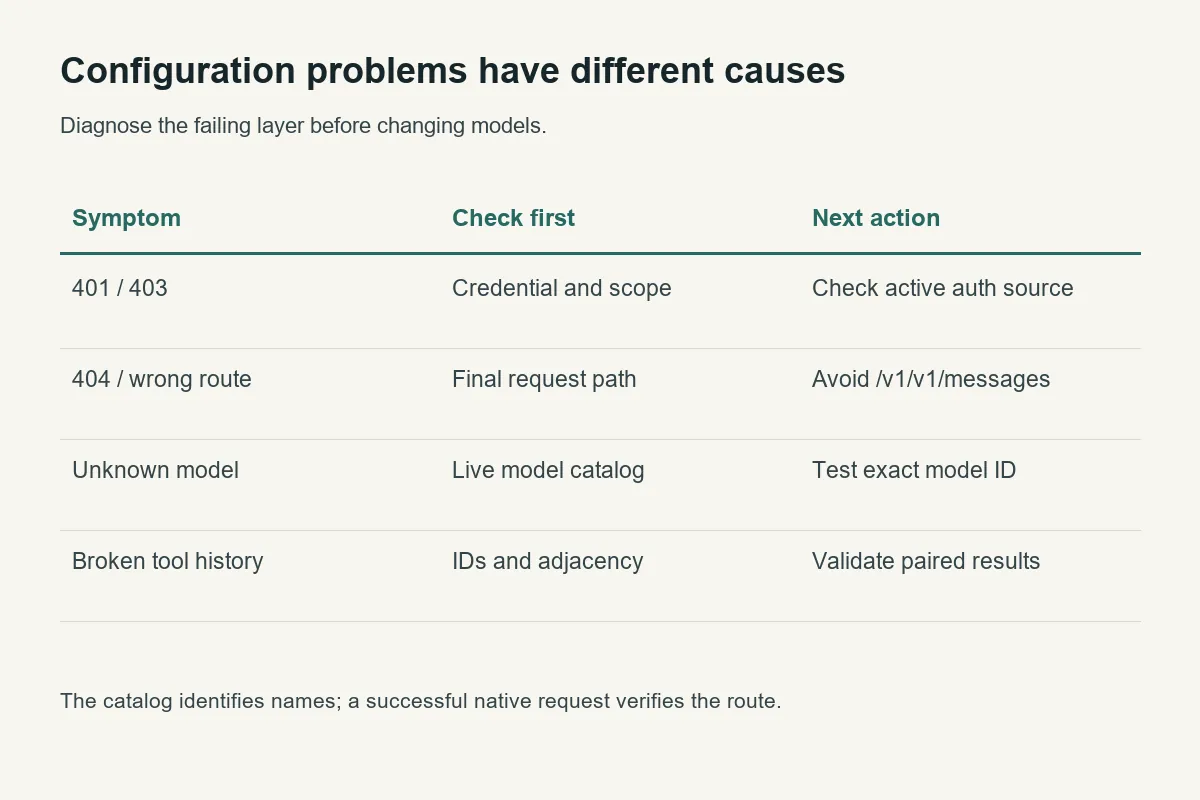
For 401 or 403, check the active credential, its scope, and the host receiving it. For 404, inspect the final path. For a model routing error, check the exact identifier and make a small native request. Retrying a misspelled model cannot repair it.
For missing tool results, preserve the assistant's complete content blocks and return one result for every requested tool ID in the next user message. The tool_use_id and tool_result troubleshooting includes a full validator and runnable round trip. For unexpected token costs, inspect cache counters as described in the prompt-cache miss investigation before attributing the change to output length.
A useful escalation record includes the client version, selected model, endpoint, timestamp, response/request ID, and a redacted error. Never include the API key or private repository contents in a public issue.
FAQ#
Does Claude Code use /v1/chat/completions?#
This native configuration uses /v1/messages. A Chat Completions success can validate a different client but does not establish Claude Code compatibility.
Should ANTHROPIC_BASE_URL include /v1?#
For the tested setup, no: use https://cn.crazyrouter.com. The client adds the native Messages path.
Can I use my Claude subscription as the gateway API key?#
No. Use the credential issued for the gateway's API path. Subscription authentication and gateway API billing are different mechanisms.
Why test a file read after a successful API response?#
A file read exercises the client tool loop and local permissions. Those can fail even when a plain model response succeeds.
Is --bare required for everyday use?#
No. It made this controlled test easier to interpret by skipping automatic integrations. Re-enable your normal features deliberately and verify them under your organization's settings.
Does this prove every Claude model works?#
No. The measured model was claude-sonnet-4-6 on the stated date. Model availability and feature behavior need their own checks.