 简体中文
简体中文 繁體中文
繁體中文 English
 Français
 Русский
 日本語
日本語 Tiếng Việt
 한국어
한국어 Deutsch
 Español
 Italiano
 Português
 العربية
 ไทย
ไทย Bahasa Indonesia
 Bahasa Melayu
 Türkçe
 Polski
 Nederlands
 Dansk
Dansk Norsk
Norsk Қазақша
Function Calling Across Providers: OpenAI and Claude Tool Round Trips
Compare native tool message formats and run verified Python round trips for GPT-4.1-mini and Claude Sonnet 4.6, with argument validation and result correlation.

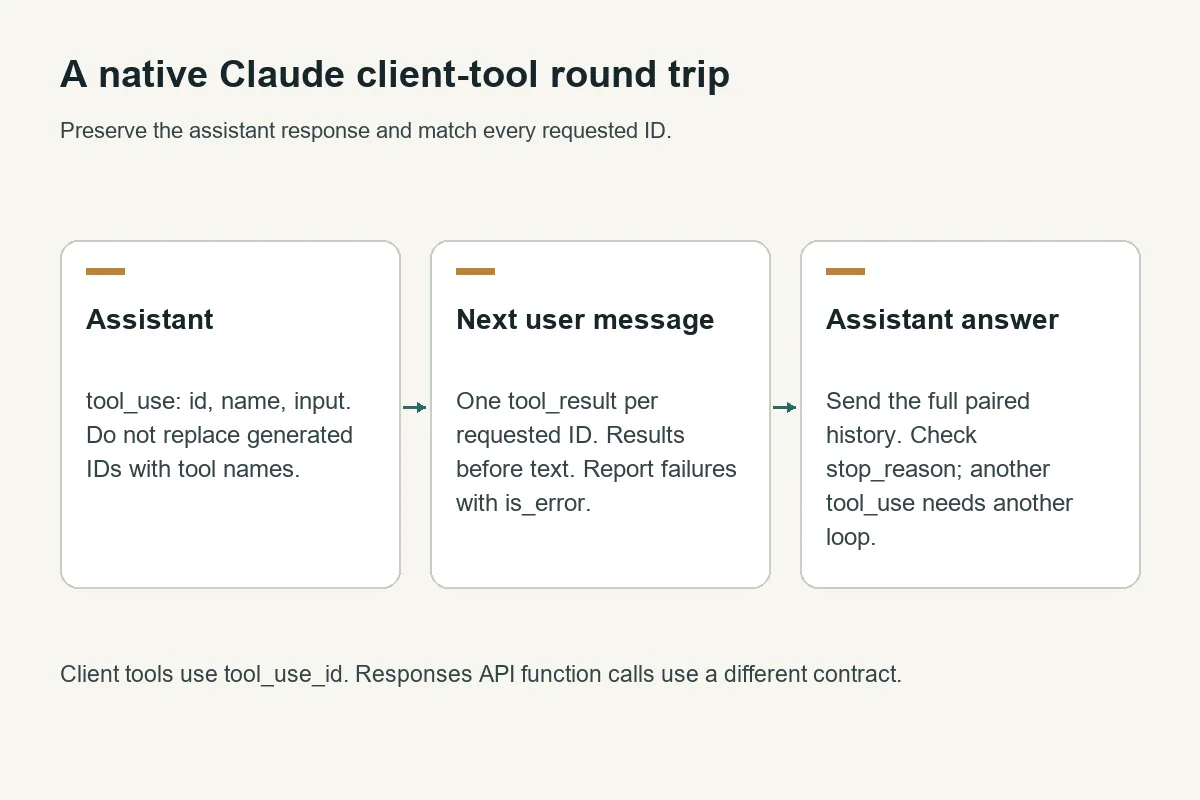
Function calling across providers uses the same application loop—declare a tool, inspect the model's request, execute authorized code, and return its result—but the message envelopes differ. OpenAI Chat Completions returns tool_calls; Claude Messages returns tool_use blocks and expects tool_result blocks in the next user message.
With Crazyrouter, we verified both formats through https://cn.crazyrouter.com/v1: GPT-4.1-mini and Claude Sonnet 4.6 each requested the synthetic lookup_ticket tool and then reported the returned resolved status. These tests check protocol compatibility, not comparative reasoning quality or production reliability.
What changes between OpenAI, Claude, and Gemini function calling?#
| Concern | OpenAI Chat Completions | Claude Messages | Gemini native API |
|---|---|---|---|
| Tool declaration | tools[].function.parameters | tools[].input_schema | Function declarations with parameters |
| Model requests work | Assistant tool_calls[] | Assistant content tool_use | Model content functionCall |
| Arguments | JSON-encoded string | JSON object in input | Object in args |
| Application returns output | Message with role: tool | User content tool_result | functionResponse part |
| Correlation | tool_call_id matches call id | tool_use_id matches block id | Preserve the SDK's function-call correlation and model parts |
| This article's live coverage | GPT-4.1-mini on Crazyrouter | Claude Sonnet 4.6 on Crazyrouter | Documentation comparison only |
The OpenAI column describes Chat Completions. The Responses API uses a different item format and should have its own adapter. Likewise, the Gemini column is not a claim that a Gemini model behind an OpenAI-compatible route accepts Gemini-native messages. Select the endpoint and its contract first.
For provider-specific details, use the OpenAI function-calling guide, Claude tool definitions and result rules, and Gemini function-calling guide. Preserve native response parts required by the provider rather than rebuilding history from visible text alone.
A tested Python round trip for both message formats#
The program below uses a synthetic ticket; it never reads a customer system. Install requests, set CRAZYROUTER_API_KEY, and save it as tool_protocol_demo.py. It uses a direct connection; if your environment requires a proxy, configure the session for that environment.
Run python tool_protocol_demo.py. Each protocol makes two paid model requests: one forced tool request and one answer after the application supplies the result. The second request removes the forced-tool setting so the model can answer instead of being forced to call the tool again.
"""Compare two real tool protocols using a read-only synthetic fixture."""
import json
import os
import requests

BASE = os.getenv("CRAZYROUTER_BASE_URL", "https://cn.crazyrouter.com/v1").rstrip("/")

def run(protocol):
    session = requests.Session()
    session.trust_env = False  # This fixture uses a direct connection.
    headers = {"Authorization": "Bearer " + os.environ["CRAZYROUTER_API_KEY"],
               "anthropic-version": "2023-06-01"}
    schema = {"type": "object", "properties": {"ticket_id": {"type": "string"}},
              "required": ["ticket_id"], "additionalProperties": False}
    function = {"name": "lookup_ticket", "description": "Read a synthetic support ticket."}
    native = protocol == "claude"
    function["input_schema" if native else "parameters"] = schema
    payload = {
        "model": "claude-sonnet-4-6" if native else "gpt-4.1-mini", "max_tokens": 150,
        "messages": [{"role": "user", "content": "Look up synthetic ticket DEMO-42 and tell me its status."}],
        "tools": [function] if native else [{"type": "function", "function": function}],
        "tool_choice": {"type": "tool", "name": "lookup_ticket"} if native else
                       {"type": "function", "function": {"name": "lookup_ticket"}},
    }
    def send():
        response = session.post(BASE + ("/messages" if native else "/chat/completions"),
                                 headers=headers, json=payload, timeout=60)
        response.raise_for_status()
        return response.json()
    first = send()
    assistant = ({"role": "assistant", "content": first["content"]} if native else
                 first["choices"][0]["message"])
    calls = ([b for b in assistant["content"] if b["type"] == "tool_use"] if native else
             assistant.get("tool_calls", []))
    if not calls:
        raise ValueError("Expected a tool request")
    results = []
    for call in calls:
        name = call["name"] if native else call["function"]["name"]
        arguments = call["input"] if native else json.loads(call["function"]["arguments"])
        if name != "lookup_ticket" or arguments != {"ticket_id": "DEMO-42"}:
            raise ValueError("Tool or arguments outside the allowed fixture")
        content = json.dumps({"ticket_id": "DEMO-42", "status": "resolved"})
        results.append({"type": "tool_result", "tool_use_id": call["id"], "content": content} if native else
                       {"role": "tool", "tool_call_id": call["id"], "content": content})
    payload["messages"].append(assistant)
    payload["messages"].extend([{"role": "user", "content": results}] if native else results)
    del payload["tool_choice"]
    final = send()
    answer = final["content"] if native else final["choices"][0]["message"].get("content")
    if "resolved" not in json.dumps(answer).lower():
        raise ValueError("The model did not return the fixture result")
    return {"protocol": protocol, "tool_calls": len(calls), "answer": answer}

if __name__ == "__main__":
    for protocol in ["openai", "claude"]:
        print(json.dumps(run(protocol), ensure_ascii=False))
On October 11, 2026, the final script returned one tool request in each protocol and both final answers contained resolved. An earlier verification run hit a 60-second Claude read timeout; the subsequent complete run passed. A successful small fixture does not demonstrate an uptime or latency percentile.
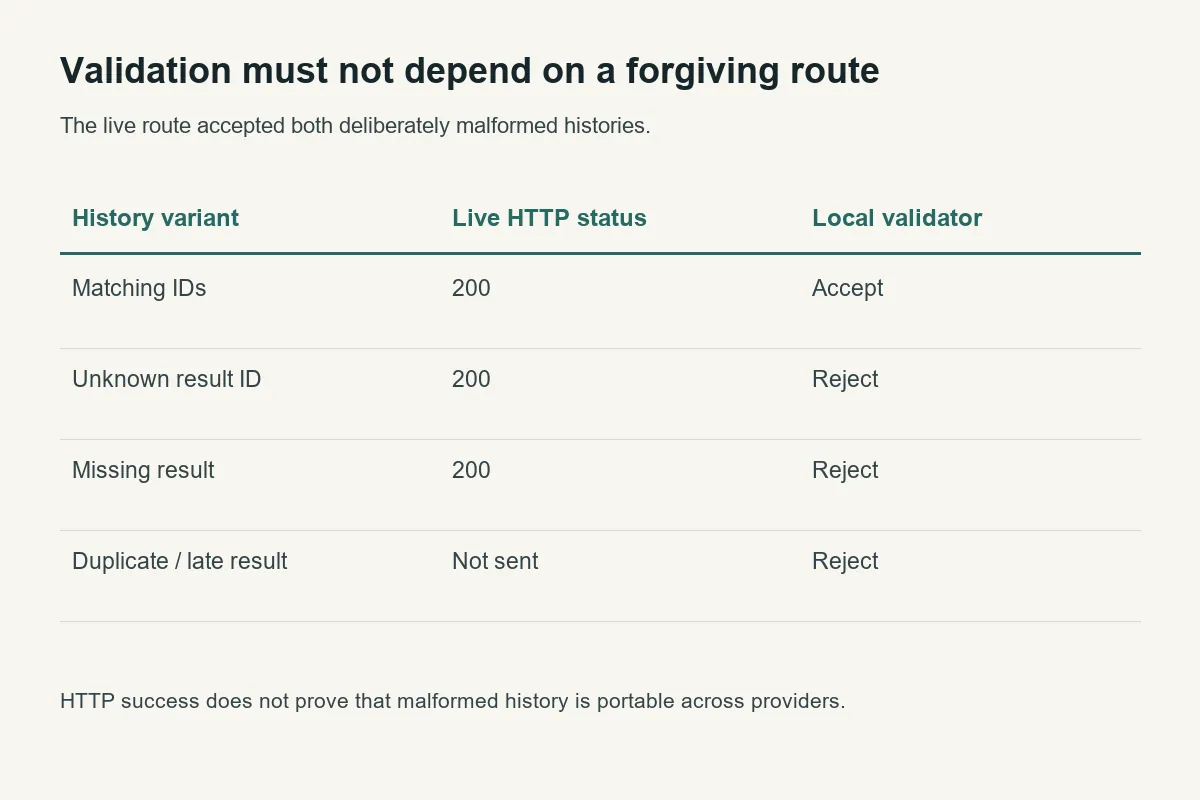
The test deliberately validates both the tool name and the complete argument object before returning data. It preserves the assistant message and correlates the result to the returned ID. A real implementation must also authorize the current user, validate types and bounds, and make every tool's side effects explicit.
How do you handle multiple tool calls and errors?#
Collect all calls in the assistant turn. Validate each one, execute only authorized operations, and provide one result for every required call before asking for another model turn. This fixture returns an entry for each synthetic request, but deliberately stops after one tool round; an autonomous agent needs a bounded loop, an overall deadline, and a termination policy.
Claude result blocks belong in the immediately following user turn and should precede any user text in that message. OpenAI Chat Completions uses separate tool-role messages. Mixing the formats is a common reason a request works as plain chat but fails when tools are enabled.
If the problem is a missing ID or an incorrectly ordered block, use the Claude tool result error guide, which focuses on validation and malformed conversations. This page focuses on the adapter boundary between protocols.
Keep transport retries separate from tool execution#
A model call and a tool action have different replay consequences. Repeating a ticket lookup is usually harmless; repeating a payment or sending a message is not. Persist operation IDs and completion state for side-effecting tools before deciding whether a retry is safe.
Avoid resetting the entire conversation after a transport error. Preserve the completed tool result and inspect whether the next model request may already have been processed. The bounded Python retry example covers attempt caps, deadlines, and Retry-After without assuming replay is always safe.
Measure completed tasks, not just successful HTTP responses#
Our initial protocol probe produced four HTTP 200 responses. That alone was insufficient: we also checked the requested function, the synthetic ticket ID, the matching result ID, and the final answer's use of the returned status. A 200 containing an unexpected function or unusable output must fail application validation.
| Integration choice | What it simplifies | What your application still owns |
|---|---|---|
| Direct provider SDK | Native types and provider-specific features | Provider credentials, permissions, validation, retries |
| Crazyrouter with explicit native adapters | A shared access point for the tested model routes | Endpoint-specific envelopes, tool authorization, output validation |
| Application tool registry | A single place to define business operations | Mapping each protocol and preventing duplicate side effects |
Record request IDs, requested and reported model names, tool count, validation result, and attempts. Keep secrets and raw ticket contents out of metric labels. The AI API request logging guide shows a concrete record format. Check current model pricing before estimating the full multi-request workflow.
Frequently asked questions#
Can I reuse the same JSON schema across providers?#
You can often share a constrained business schema, but must adapt the declaration envelope and check the provider's supported schema subset. Passing the same JSON object unchanged to every native API is not a compatibility strategy.
Does the model execute my Python function?#
In this client-tool example, no. The model requests a named operation; your application validates and executes it, then returns data. That application boundary is where authorization belongs.
Can I use the Chat Completions example with Codex Responses?#
Not unchanged. Responses has its own function-call items and output correlation. Start with the Codex custom-provider verification guide to verify the actual endpoint contract.
Was Gemini tested in this comparison?#
No. The native Gemini mapping above comes from its documentation; the live fixture covers the two explicitly named Crazyrouter routes only.